Screenshot monitoring and screen recording software
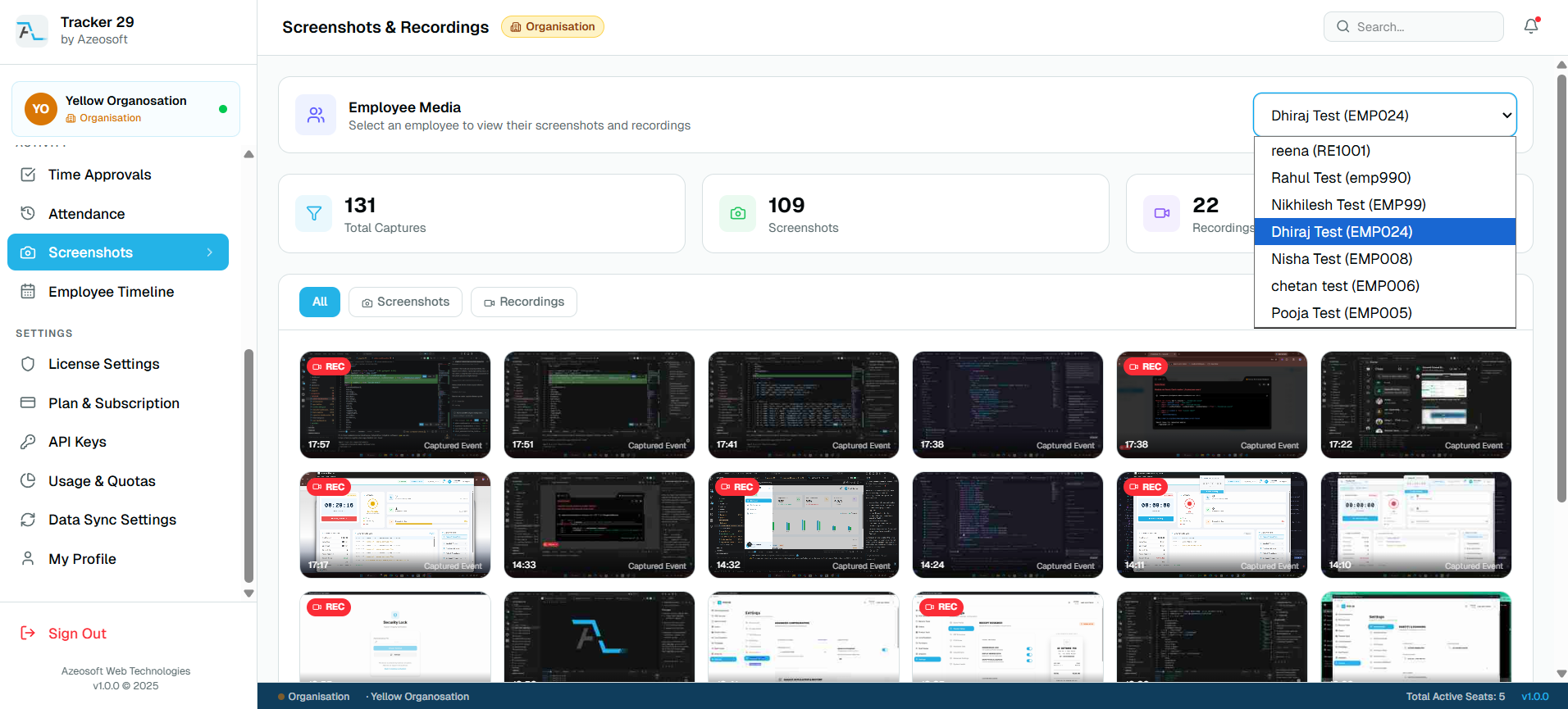
Capture employee screenshots and screen recordings at configurable intervals with secure storage, timestamped galleries, and manager review workflows.
Transparent proof of work for distributed teams
Screenshots and recordings help managers verify work progress, support client billing, and review context when productivity reports need more detail.
Configurable capture and retention
Tracker 29 supports different capture intervals, media quality settings, and retention periods by plan, so teams can balance visibility, storage, and compliance.
Frequently asked questions
Does Tracker 29 capture screenshots?
Yes. Screenshots can be captured at configured intervals based on plan and admin settings.
Is screen recording included?
Screen recording is available on Premium and Enterprise plans.
Related features
Productivity Tracker
Track employee work hours, activity levels, app usage, attendance, and productivity trends with Tracker 29. Start with a free plan for up to 10 seats.
Floating Timer
Use an always-available desktop floating timer to start work, pause, take breaks, and track employee time without interrupting focus.
Free API Access
Use Tracker 29 API access to connect employee productivity, attendance, app usage, screenshot, and reporting data with your internal tools.
Screenshot Access
Review employee screenshots from a secure dashboard with timestamps, session context, capture counts, retention controls, and manager-friendly proof of work.
Ready to Get Started
Ready to boost your team's productivity?
Join thousands of teams that track smarter, not harder. Choose a plan and get your workforce intelligence platform running in minutes.
Simple setup · Dedicated support · Cancel anytime