Live screen monitoring software
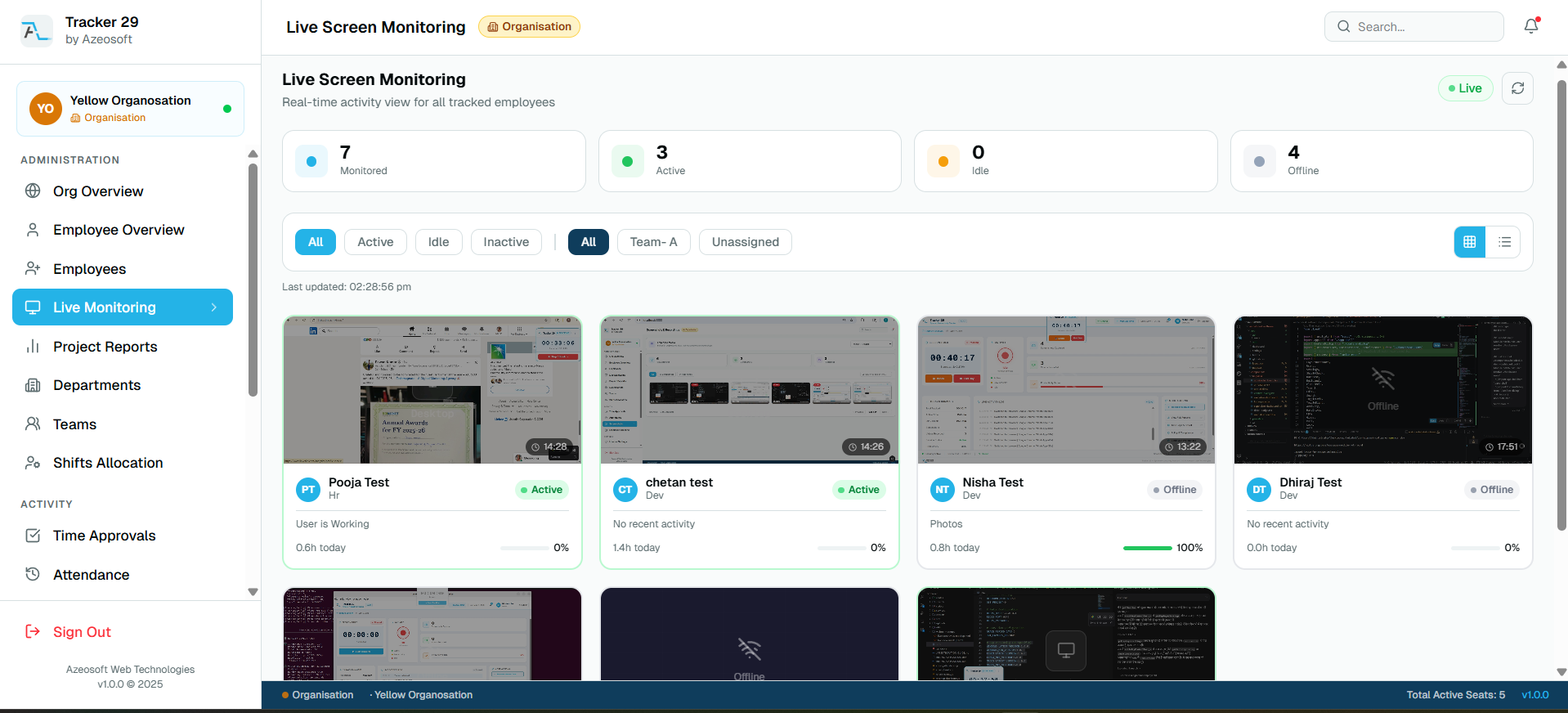
View employee screens in real time from a secure web dashboard with live status, multi-monitor support, and team-level visibility.
Realtime visibility from the browser
Managers can open the dashboard and view live employee screens when immediate context is needed for support, compliance, or operational oversight.
Designed for remote and office teams
Live screen monitoring works for distributed teams, while enterprise deployments can use LAN-based monitoring for stricter network requirements.
Frequently asked questions
Can managers view employee screens live?
Yes. Authorized managers can view live screens from the web dashboard.
Does live screen monitoring support multiple monitors?
Yes. Tracker 29 supports multi-monitor tracking for connected screens.
Related features
Productivity Tracker
Track employee work hours, activity levels, app usage, attendance, and productivity trends with Tracker 29. Start with a free plan for up to 10 seats.
Floating Timer
Use an always-available desktop floating timer to start work, pause, take breaks, and track employee time without interrupting focus.
Free API Access
Use Tracker 29 API access to connect employee productivity, attendance, app usage, screenshot, and reporting data with your internal tools.
Screenshot Access
Review employee screenshots from a secure dashboard with timestamps, session context, capture counts, retention controls, and manager-friendly proof of work.
Ready to Get Started
Ready to boost your team's productivity?
Join thousands of teams that track smarter, not harder. Choose a plan and get your workforce intelligence platform running in minutes.
Simple setup · Dedicated support · Cancel anytime